Shortcuts

Howdy, I inadvertently stumbled onto this space while looking for a version of the help documents for the iOS app.

https://kinopio.club/UXhzC0bAMBgCC_RB14LdR

I responded as a comment that I would prefer shortcuts over a widget. I am making a forum thread per Pirijan’s request to explain this more. It was an off handed comment but I will try to help and explain.

I have found that widgets have really poor refresh rates, many apps encounter users complaining that an app doesn’t show the correct current information, even within 24 hours. I often view the widget as a glorified way of opening the app with a bigger surface area. It can be very advantageous to get users to be willing to dedicate that much of their daily screen time to include your app, but it can struggle to maintain that spot as well.

I like shortcuts because they can be triggered via Siri. You can use shortcuts as widgets. My favorite shortcut widget is 2 x 4. For the space of 8 apps or 2 widgets, I can have 4 shortcuts. Compared to other widgets, I have found that it doesn’t have as much trouble registering which area I have tapped (sometimes I try to tap an icon like a play button on a widget, and it doesn’t work or opens the app). Plus, you get a check mark knowing when the shortcut is completed.

Even if you do make a widget, shortcuts are still good for setting up ways to compensate for the fact a mobile version cannot register certain inputs the way desktop can, or better leverage the potential the app has to work in a mobile setting.

Shortcuts are useful for quickly taking something from your clipboard or last image in your library, plus other metadata it can access, like the time, date, and weather. I can use shortcuts to share links quickly to apps that support entries via a shortcut without having to open the app. I can use shortcuts to query my earbuds to pair if they’re online, letting me switch devices and quickly start playing music off my preferred app.

It’s true that there aren’t many things that shortcuts might alway be in handy for, but for things that widgets are intended for functionally, I think it’s better to find a way to bring it into shortcuts. In comparison, I think very visual and slow moving information is better for widgets, without much interactions.

I hope this helps :victory_hand:

1 Like

Also sorry if I wasn’t supposed to comment on that space. I just noticed it was public view with comments so I made one while passing through.

1 Like

That’s totally fine!

@lucas any interest/time for adding some basic shortcuts to the iOS app?

1 Like

Would be a pleasure. Looks like Apple builds a lot of new functionality around shortcuts (App Intents) in iOS 27, so this sounds like a good investment. I also just finished some advanced shortcuts work on another project so everything is still fresh in my mind.

What kind of shortcuts do users want? I can imagine they have opinions. :brown_mushroom:

2 Likes

Currently the Kinopio app supports 2 shortcut actions.

  • Open Space: Opens the selected space inside the app
  • Create new card: Creates a new card with name in the selected space. (Optional, x/y/z coordinates)
1 Like

this is a better question for more frequent users, but this is what I would suggest off the top of my head.

Shortcut to add to a specific box in a space, rather than using coordinates, since if you don’t have the app open, it can be hard to remember where things are. Similarly, you could add as a child card, and organize it later.

Shortcut to add a card and a comment at the same time, in case you want to add a card to a shared space, with a description as a comment.

Shortcut that can leverage adding metadata to card, such as clipboard content, weather, photo, etc.

I am happy to test but also think other users should be prioritized, since I am mostly spitballing and am not sure broadly applicable they are.

:man_bowing:

referenced some widget based threads above, perhaps the can be addressed via shortcuts instead

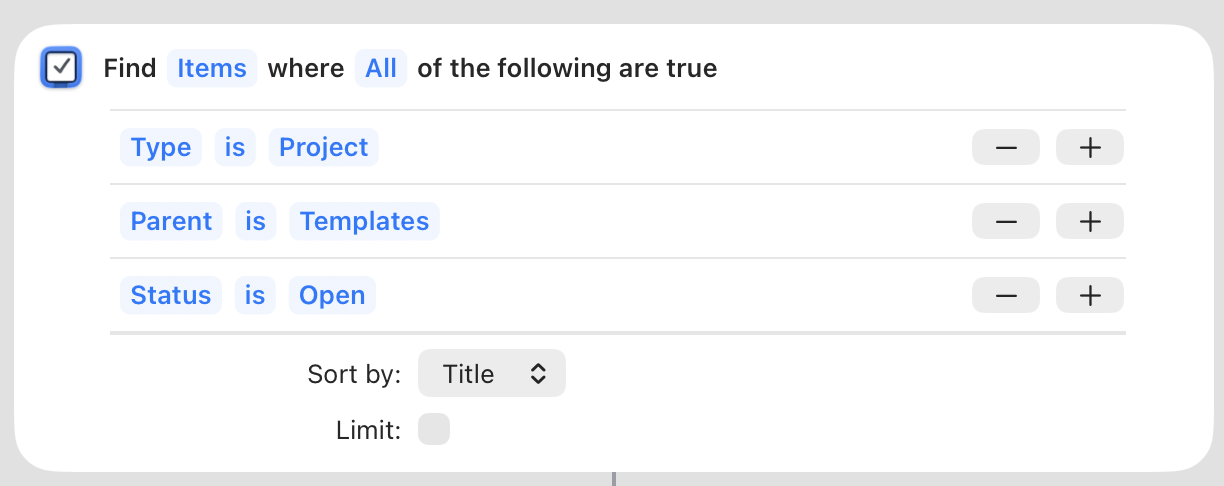
My #1 request is a Find Items action! Shortcuts has these wonderful filtering blocks where you can make a query and stack up a bunch of filters on it, sort of SQL-ish. You can use them to fetch items from the app or filter an existing list of items, which means you can layer several filtering blocks together to get really granular. Things has a great Find action; here’s a simple example from one of my shortcuts:

The more filters the better. There are basically endless uses for these, but off the top of my head I’d love to use something like “find cards in space ‘todo’ in list named ‘monday’ with tag ‘chore’”. I’d use this for managing tasks in Kinopio, or maybe sketching out plans in Kinopio and then importing them into Things, but the sky’s the limit.

Since card position is a huge part of how spaces work, I’d want to be able to get the x and y coordinates of everything in a space through shortcuts, and filter on it too. For example, if I could “find lines in some_space” using the Find action, I could then pull out the y-axis numbers from two lines I care about and “find cards in some_space where y is between line A and line B”. That would let me use lines to mark out a zone that I want my shortcut to act on.

Ooh, while I’m here, it would be so helpful to be able to sort by x and y coordinates as well as title. I use rows of lists as little kanban boards and I’d love to grab all the lists with a shortcut and sort them by x position, then get the cards from each list and sort by y position. That way I could process the cards in order.

I’m absolutely willing to whip up some shortcuts if you need a tester.

I hope this helps!

I think a find card action like the Things example could be pretty powerful. That’s a good example. From what I have seen about iOS 27 that’s then also something Siri could make use of to find cards and spaces.

The only thing that’s missing for something like this would be some additions to the /card/search route to support more than just a card title filter. That would include some work outside of the iOS app.