A card that can have a customisable counter that is shared for everyone to see - with a little sound at the end. This is great for giving a team a set task and also great if responding to a presentation that is also using a time limit. Stop, Start and Reset buttons would be also very useful
5 Likes
there’s been some discussion about a timer widget. I would find this useful as well – currently I use a separate webpage as my timer.
2 Likes
yes I use a separate one myself, normally on an iPad at the front large count down so everyone sees but I think this could easily be a feature within kinopio by just having a special syntax for a card /timer3mins
Of course in true kinopio style when timer ends then keyboard cat should appear large and play them off
2 Likes
+1 from my side
1 Like
+1
I currently use my phone but would prefer to have everything in one place
1 Like
tell me more about how you use your phone? what kind of lengths of time do you time? and what specific kinds of use cases do you decide to time?
In my case I use timers all the time, for everything tbh 
lenghts: from 3-5 minutes to even an hour
1 Like
are the timers you set related to specific spaces or cards?
Can live without it
1 Like
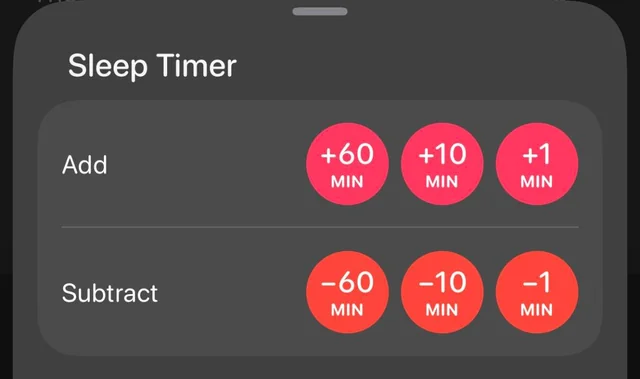
I think the easiest way to implement this would be to have a ‘timer’ option in the sidebar, scoped to a space (like notes), that would let you quickly start/stop a countdown timer (here’s the sleep timer in overcast as an example)
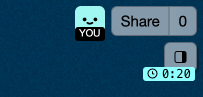
and when the timer is active , the sidebar button displays the current countdown time to all collaborators.
The hard parts are in the details:
- if you close the app and come back the timer needs to show the updated time
- the current countdown time needs to be roughly synced between collaborators
- if collaborators join after the timer is initially set , they need to see the current timer
- what should happen when the timer is complete when the user is on the space? (a standard notification?)
- what should happen when the timer is complete when the user is in a different space? or if the app is closed?
here’s a cool video about how programming timers has deceptively high complexity https://www.youtube.com/watch?v=VzjvBYaGHgA
Continuing some feedback from Discord, there’s another take on a timers feature that I think is really interesting.
The app TaskTXT does a really neat thing with plaintext and timers. It stores timers in plaintext, in the format 1h 1m 1s (all parts optional). When you start a timer, it stores the timestamp of when you clicked the start button in plaintext next to the timer in the format 1:23:45pm. Partially run timers store their elapsed time like this: 1h 1m 1s / 36m 52s. These values are parsed out and the displayed timer is just computed from them. (here’s a video that shows it: https://youtu.be/gbGawb728xA?si=X3XY9NrMO6X1mZGe&t=191)
I feel like this approach or something like it would fit Kinopio really well, since Kinopio already uses plaintext for features like images, links, formatting, and checkboxes. It has the same advantages as those other features: it’s easy to make a timer from the keyboard, timers can be copy-pasted and will continue running, and you can edit timers to e.g. start a timer 10 minutes ago if you forgot to click start. On the other hand, it might be difficult to implement, and a slash command like /timer15m would solve most of the same problems.
What do you think?
1 Like
About timers more generally, I would really love to see timers be attached to cards, or else represented with special cards. I want to connect them to my stuff and drag them around and keep them as mementos after they’ve run out.
I also would love a stopwatch version, where instead of counting down to 0, it counts up. I love stopwatches and I use my analog watch’s chronograph every day, but it stops counting at 30m so it’s only good for short stuff.
While I’m making suggestions, I’d also love to see the regular timers keep counting overtime by going negative once the timer goes off. I find that feature super handy, since I regularly miss timers and I want to know how late I am.
Anyways, I hope these thoughts are helpful!
1 Like
that’s a really elegant solution!
I would probably use the ::systemCommand syntax for this. eg ::systemCommand=timer="1h 1m 1s / 1:23:45pm EST"
I’ll need to figure out inputing the timezone somehow
what are your timer notification preferences? Do you want to be alerted somehow when a due date has elapsed? via email?
building the spec at https://kinopio.club/-mentions-users-and-timers-spec-P_gHDa2suzZ5-NjQXwxwR
Sorry I missed your questions!
what are your timer notification preferences? Do you want to be alerted somehow when a due date has elapsed? via email?
I think ideally the app would send its own notifications via the browser or iOS. Email could work too, but then I’d love a setting to turn them off if I need to.
I would probably use the
::systemCommandsyntax for this. eg::systemCommand=timer="1h 1m 1s / 1:23:45pm EST"
If you use a command this long, I’d love some kind of shorthand to kick off a timer quickly. I wouldn’t want to have to type out ::systemCommand… with correct capitalization just to start one from the keyboard. In your spec I see you used @timer, that seems great. I’d love to write something like @timer 15m and have Kinopio figure it out from there.
ya it’d definitely be closer @timer-15m based on the syntax that’s now being used for @user mentions
1 Like
right now with space content based notifications, you have the ability to unsubscribe from notifications from that specific space. does that work?